Let us know how we can help
Sales & Pricing
Speak to a rep about your business needs

Help & Support
See our product support options
General inquiries and locations
Contact us


 Control-M + Informatica CS
Your Informatica Cloud Services workflow starts before a named Taskflow ever invokes its sequence of integration tasks — and it can fail when something upstream breaks. A Salesforce Bulk API export never completes its record extraction before the Mapping task's source connection resolves. A Snowflake task chain overruns its scheduled execution window before staging its merged records for the Taskflow's input dataset. Control-M orchestrates the full chain: Amazon S3 ingestion, Salesforce data preparation, Informatica Cloud Services execution, and Snowflake delivery.
common workflow issues
Does this sound like your week?
These aren’t edge cases. They’re the normal operating conditions for teams running Informatica data integration pipelines across multiple tools. Here’s how Control‑M handles each one.
SOURCE DATA
The S3 files arrived at 2:07 AM. Your mapping ran at 2:00.
Control-M uses event-driven file detection and dependency conditions to launch Informatica jobs only when required source data is present and validated. No missed loads, no wasted execution cycles, and no manual reruns.
PIPELINE FAILURES
One transformation failed. Five downstream jobs kept running.
Control-M detects Informatica job exit states in real time and prevents downstream execution when prerequisites fail. Automated recovery workflows isolate the issue and stop error propagation across the pipeline.
CROSS-PLATFORM DATA
Salesforce completed. Snowflake loaded. Informatica never got triggered.
Control-M orchestrates dependencies across cloud applications, data platforms, APIs, and Informatica services. Cross-tool conditions trigger workflows immediately when upstream processes complete successfully.
SLA RISK
The morning dashboard deadline is approaching. The load is still running.
Control-M continuously tracks SLA status across Informatica workflows, predicts potential breaches, and alerts operators before deadlines are missed, enabling intervention before business users feel the impact.
OPERATIONS VISIBILITY
The job failed overnight. Nobody knows where.
Control-M provides a unified operational view across Informatica, cloud platforms, databases, and file transfers. Teams can quickly identify the failure point, understand dependencies, and restore service faster.
INTEGRATION FACTS
Control‑M + Informatica CS
|
workload.types |
ETL workflows · ELT pipelines · data synchronization · bulk data loads · cloud application integration · data warehouse refreshes |
|
trigger.type |
file arrival (S3 · Azure Blob · Google Cloud Storage) · API/webhook · Informatica task completion · database event · time schedule · upstream job exit code |
|
cross_tool.deps |
Snowflake load completion · Databricks job execution · Salesforce data extraction · SAP data transfer · REST API orchestration · file delivery confirmation · Airflow DAG trigger |
|
cloud.platforms |
AWS · Microsoft Azure · Google Cloud Platform · Informatica Intelligent Cloud Services · hybrid environments |
|
error_handling |
configurable retry count · automated recovery workflow · downstream cascade prevention · exception routing · SLA pre-breach alert · PagerDuty · Slack |
|
throughput |
high-volume batch processing · parallel data integration tasks · large-scale cloud migrations · enterprise ETL workloads |
|
observability |
job-level audit log · dependency lineage graph · SLA tracking and prediction · centralized monitoring dashboard · Datadog/Splunk integration · SIEM-compatible events |
end-to-end orchestration
One production workflow. Every tool in the stack.
Control-M orchestrates workflows across Informatica, Snowflake, Databricks, Salesforce, file transfers, APIs, and cloud services in a single job flow—with dependency tracking, SLA visibility, and automated recovery across all of them.
- Cross-tool dependency: Salesforce extract → Informatica mapping → Snowflake load → Power BI refresh
- Data-aware triggers: file arrival, API event, Informatica task completion, warehouse load completion
|
Informatica Cloud |
task execution · status monitoring · dependency control · automated recovery |
|
Snowflake |
warehouse loads · SQL execution · downstream triggers · SLA tracking |
|
Databricks |
notebook execution · Spark jobs · dependency orchestration |
|
Salesforce |
data extraction · synchronization workflows · event-based triggers |
|
Amazon S3 |
file arrival detection · validation · secure transfer monitoring |
|
REST APIs |
event triggering · workflow integration · status collection |
|
Power BI |
report refresh orchestration · delivery scheduling · completion tracking |
airflow coexistance
Control-M doesn’t replace your Airflow DAGs. It runs the layer above them.
The objection is common: “We’re already on Airflow.” The issue isn’t what Airflow does – it’s what happens before and after Airflow runs. That’s where pipelines actually fail.
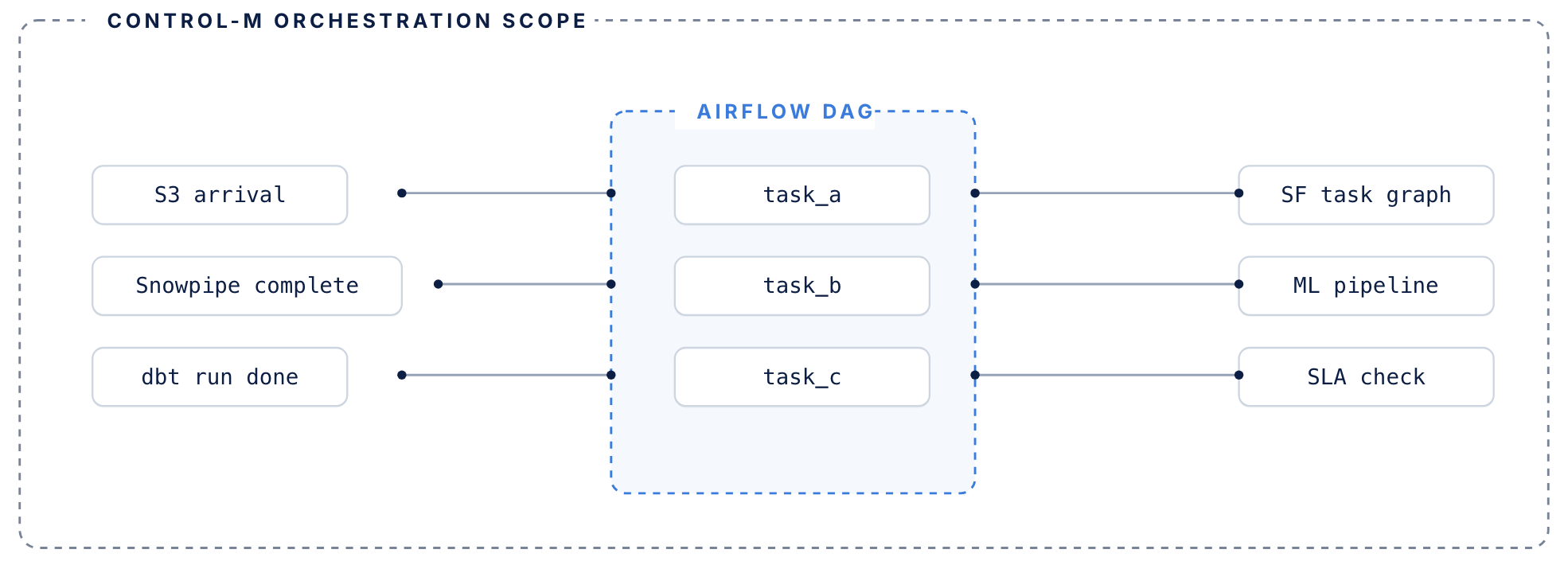
Airflow manages its DAG. Control-M manages everything surrounding it.
AIRFLOW HANDLES
DAG-level orchestration inside the data pipeline
- DAG-level task orchestration within data pipelines
- Python operators, sensors, and task dependencies
- Execution graph for jobs that run inside your pipeline
- Manages retries within a single DAG context
control-m adds
The coordination layer around your DAGs
- Coordination layer around DAGs — triggers Airflow based on upstream conditions: file arrivals, API events, other tool completions
- Tracks each DAG’s SLA contribution across the full end-to-end workflow, not just its own routine
- Manages failure recovery when upstream dependencies fail before Airflow even starts
- Existing DAGs don’t need to be rewritten or migrated
MONITOR PIPELINES
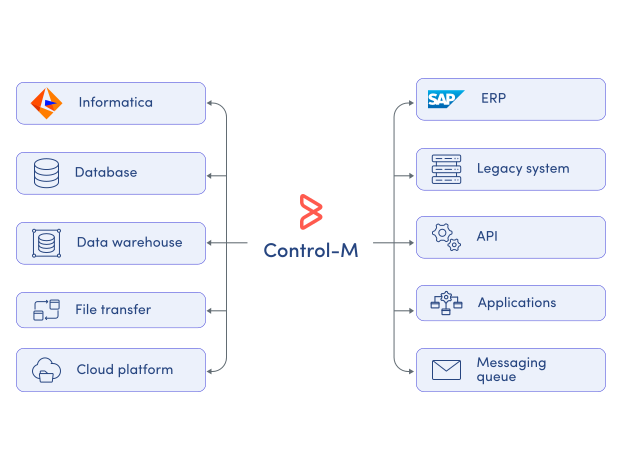
Monitor Informatica workflows across the entire data stack.
Informatica provides execution visibility inside its own environment, but production pipelines span many systems.
Control-M delivers centralized operational visibility across the complete workflow lifecycle:
-
Pipeline execution status
-
Runtime history tracking
-
Dependency visualization
-
SLA risk indicators
-
Failure root-cause analysis
sla assurance
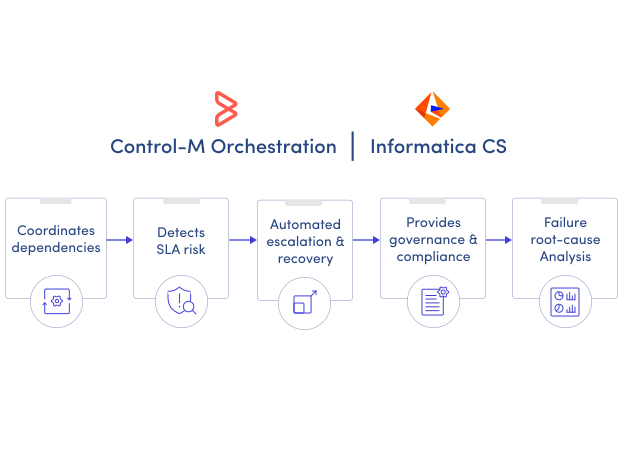
Keep Informatica data delivery commitments on track.
Informatica executes integrations, but business users depend on complete end-to-end delivery.
Control-M monitors every upstream and downstream dependency, predicts SLA risks, and automates recovery actions before deadlines are missed:
-
SLA breach prediction
-
Automated exception handling
-
Event-driven workflow triggering
-
Escalation notifications
-
Business service monitoring
Documentation
Bring order to complex workflows
Learn how Control-M helps teams orchestrate complex processes with greater visibility, coordination, and control.
