Let us know how we can help
Sales & Pricing
Speak to a rep about your business needs

Help & Support
See our product support options
General inquiries and locations
Contact us


 Control-M + Jenkins
Your Jenkins workflow starts before a pipeline build ever runs — and it can fail when something upstream breaks. A GitHub Actions workflow fails before publishing the required build artifact. A Terraform workspace run takes longer than expected and delays environment provisioning. Control-M orchestrates the full chain: artifact creation, infrastructure provisioning, Jenkins execution, and application deployment.
common workflow issues
Does this sound like your week?
UPSTREAM DEPENDENCY
Your Terraform run is late. Jenkins starts before infrastructure is ready.
Control-M makes the Jenkins job dependent on successful completion of the upstream infrastructure job, integrating Jenkins into a single scheduling environment with other Control-M jobs. The pipeline starts only after its prerequisite is satisfied, replacing disconnected schedules with explicit cross-tool dependencies and preventing deployments from running against an environment that is not ready.
API THROTTLING
Jenkins returns HTTP 429. Your deployment trigger stops before the build.
Control-M detects configured HTTP response codes and reruns the execution step automatically. Teams can define the rerun interval and number of attempts in the Jenkins connection profile, absorbing transient API failures without immediately turning them into failed workflows.
FAILURE CASCADE
The Jenkins pipeline fails. Your downstream release jobs are still waiting.
Control-M monitors Jenkins status and results while managing dependencies across the complete job flow. A failed Jenkins job prevents dependent work from being released, containing the failure and giving operators a coordinated recovery path instead of disconnected troubleshooting.
TROUBLESHOOTING DELAY
Jenkins failed overnight. The console output holds the missing clue.
When the Fetch Console Logs option is enabled, Control-M retrieves Jenkins console logs and surfaces job status, results, and output alongside the orchestrated workflow. Operators get the execution evidence alongside surrounding dependencies, reducing the time spent moving between tools to determine where recovery should begin.
SLA RISK
The build succeeded. The end-to-end release is still running late.
Control-M lets you attach an SLA job to Jenkins jobs while tracking the surrounding dependencies. Teams can manage Jenkins as one step in the complete production workflow, so successful build completion does not hide delays elsewhere in the service chain.
INTEGRATION FACTS
Control‑M + Jenkins
|
API and automation capabilities |
Automation API · Control-M CLI · Jenkins pipeline/job execution · pipeline parameters · console-log retrieval · job status, results, and output monitoring |
|
Deployment models & infrastructure flexibility |
Control-M SaaS · self-hosted Control-M · Control-M Web · Automation API · Linux Agent · Windows Agent · any Jenkins endpoint |
|
Security posture |
centralized connection profile · Jenkins API token · external vault support · centralized credentials · Control-M authorizations · secure endpoint connection |
|
Incident response & MTTR enablement |
HTTP-code rerun · configurable rerun interval · configurable retry attempts · console-log retrieval · job result monitoring · complex dependencies · SLA jobs |
end-to-end orchestration
One production workflow. Every tool in the stack.
Control-M orchestrates workflows across Jenkins, GitHub Actions, Terraform, Kubernetes, file transfers, and cloud services in a single job flow — with dependency tracking, SLA visibility, and automated recovery across all of them.
- Cross-tool dependency: GitHub Actions → Terraform → Jenkins pipeline → Kubernetes deployment
- Data-aware triggers: file arrival, API event, Terraform completion, Jenkins result
|
Jenkins |
pipeline execution · status monitoring · results and output · console logs · SLA jobs |
|
GitHub Actions |
workflow coordination · completion dependencies · downstream handoff |
|
Terraform |
workspace execution · variable passing · run monitoring · infrastructure dependencies |
|
Kubernetes |
workload coordination · deployment sequencing · cross-platform dependencies |
|
File transfers |
file arrival · transfer completion · downstream release |
|
Cloud services |
cloud job orchestration · event-driven execution · cross-cloud dependencies |
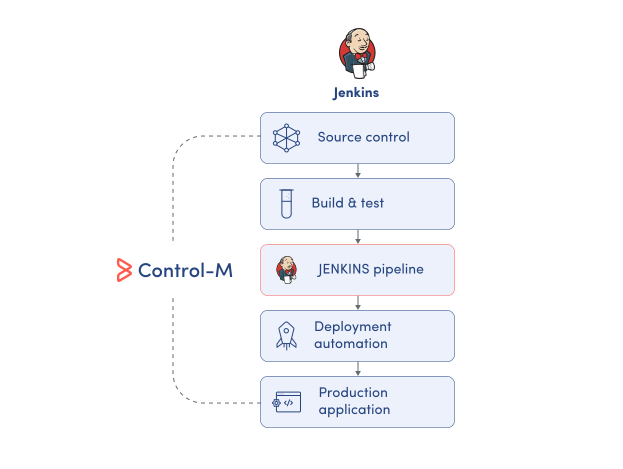
MONITOR PIPELINES
Monitor Jenkins status, results, and output centrally.
Jenkins provides execution detail for its own pipelines, but production workflows often extend across multiple platforms. Control-M brings Jenkins execution into the wider workflow view so teams can monitor what ran, what failed, and what happens next:
-
Jenkins job execution status
-
Job results and output
-
Jenkins console log retrieval
-
Upstream and downstream dependencies
-
Cross-tool workflow visibility
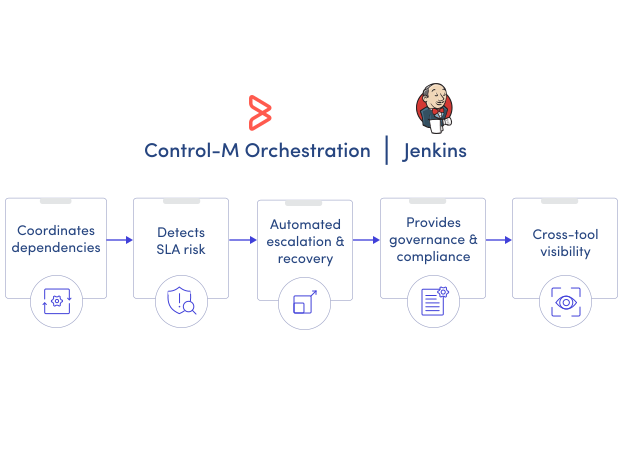
SLA ASSURANCE
Manage Jenkins within end-to-end service commitments.
A successful Jenkins build does not guarantee the complete application workflow will finish on time. Control-M connects Jenkins jobs to broader dependencies and SLA management, giving operations teams visibility beyond the individual pipeline execution:
-
SLA jobs for Jenkins
-
End-to-end dependency visibility
-
Advanced scheduling criteria
-
Shared resource coordination
-
Centralized workflow monitoring
