Let us know how we can help
Sales & Pricing
Speak to a rep about your business needs

Help & Support
See our product support options
General inquiries and locations
Contact us


 Control-M + Microsoft Power BI SP
Your Power BI workflow starts before a semantic model refresh ever runs — and it can fail when something upstream breaks. An Azure Data Factory pipeline misses its expected data load. An Azure Databricks job finishes after the reporting window. Control-M orchestrates the full chain: source data arrival, upstream transformation, Power BI refresh, and downstream report delivery.
common workflow issues
Does this sound like your week?
These aren’t edge cases. They’re the normal operating conditions for teams running Power BI workflows across multiple tools. Here’s how Control-M handles each one.
LATE SOURCE DATA
Your 7:00 AM refresh started. The Databricks transformation is still running.
Control-M models the Databricks job and Power BI refresh as dependencies in one workflow, so the refresh waits for its required upstream work to complete instead of starting against data that is not ready.
REFRESH FAILURE
Power BI returned HTTP 429. Your morning dashboard is now at risk.
Control-M can detect configured HTTP response codes, including 429, and rerun the execution step using defined attempt and interval settings. The workflow gets controlled recovery instead of relying on a business user to discover and restart the failure.
SLA RISK
The refresh is running long. Executives expect the dashboard before 8:00 AM.
Control-M attaches the Power BI SP job to the broader workflow SLA, giving operations visibility into whether dependent processing will finish on time and enabling intervention before a delayed refresh becomes a missed business reporting commitment.
DEPLOYMENT COORDINATION
Development is ready. Production still needs the latest Power BI deployment.
Control-M executes Power BI Pipeline Deployment jobs within the same scheduling environment as surrounding application and data jobs, coordinating workspace deployment with upstream and downstream dependencies instead of leaving production promotion isolated from the wider release workflow.
FAILURE VISIBILITY
The refresh failed overnight. The business discovers it from a stale dashboard.
Control-M monitors Power BI SP job status, results, and output alongside the other jobs in the workflow. Teams can identify the failed execution in operational context instead of waiting for a report consumer to flag stale information.
INTEGRATION FACTS
Control‑M + Microsoft Power BI SP
|
Platform & OS coverage |
Power BI Cloud (SaaS) · Control-M SaaS · Control-M · Windows Agent · Linux Agent |
|
Job types supported |
Data Refresh (including dataset and dataflow refresh) · Pipeline Deployment · development/test/production workspace synchronization |
|
SLA monitoring & alerting |
SLA job attachment · workflow SLA visibility · job status monitoring · results monitoring · output monitoring |
|
Audit trail & access controls |
service principal authentication · Azure AD tenant · centralized connection profile · Client ID · Client Secret · external vault support |
end-to-end orchestration
One production workflow. Every tool in the stack.
Control-M orchestrates workflows across Microsoft Power BI SP, Azure Data Factory, Azure Databricks, Snowflake, file transfers, and cloud services in a single job flow — with dependency tracking, SLA visibility, and automated recovery across all of them.
- Cross-tool dependency: Azure Data Factory → Azure Databricks → Power BI refresh → analytics handoff
- Data-aware triggers: file arrival, API event, upstream job completion, refresh completion
|
Microsoft Power BI SP |
Data Refresh · Pipeline Deployment · status/result/output monitoring · SLA attachment |
|
Azure Data Factory |
pipeline execution · dependency coordination · status tracking |
|
Azure Databricks |
job execution · dependency coordination · status monitoring |
|
Snowflake |
data workload orchestration · dependency coordination · job monitoring |
|
Managed File Transfer |
file arrival · secure transfer · downstream workflow triggering |
|
Cloud services |
cross-service dependencies · scheduling · workflow coordination |
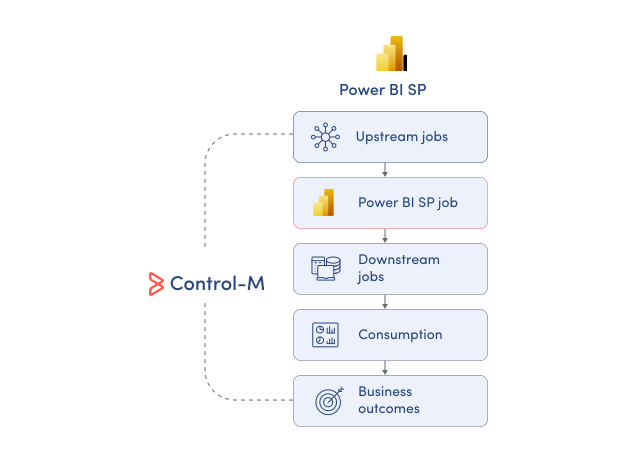
MONITOR WORKFLOWS
See Power BI refresh status in workflow context
Power BI can show what happened to its own refresh, but business reporting depends on processing beyond Power BI. Control-M provides operational visibility across the Power BI SP job and its surrounding workflow, so teams can monitor:
-
Power BI job status
-
Job results and output
-
Upstream and downstream dependencies
-
End-to-end workflow execution
-
SLA status across workflows
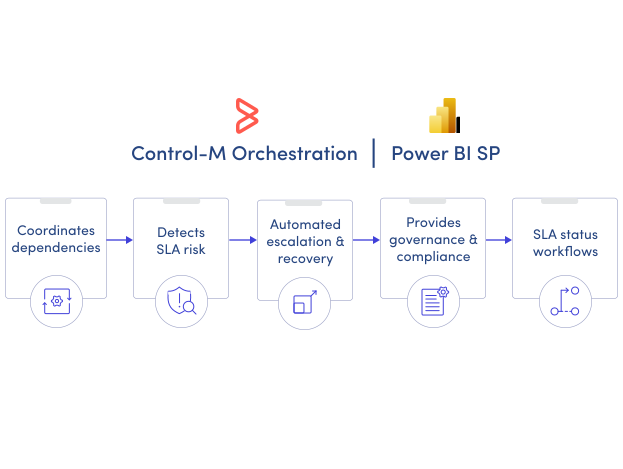
SLA ASSURANCE
Keep business-critical Power BI reporting on schedule
A successful refresh is not enough if business users receive the result too late. Control-M connects Power BI SP jobs to broader workflow SLAs, helping teams manage the timing and dependencies behind business-critical reporting:
-
Attach SLAs to Power BI
-
Coordinate upstream processing dependencies
-
Apply advanced scheduling criteria
-
Control shared workflow resources
-
Monitor end-to-end completion
Documentation
Bring order to complex workflows
Learn how Control-M helps teams orchestrate complex processes with greater visibility, coordination, and control.
