Let us know how we can help
Sales & Pricing
Speak to a rep about your business needs

Help & Support
See our product support options
General inquiries and locations
Contact us


 Control-M + Microsoft Power BI
Your analytics workflow starts before Power BI refreshes a report — and it can fail when something upstream breaks. A data load finishes late. A transformation job errors out. Control-M orchestrates the full chain: ingestion, preparation, validation, Power BI refresh, and downstream distribution.
common workflow issues
Does this sound like your week?
These aren’t edge cases. They’re the normal operating conditions for teams running Power BI reporting pipelines across multiple tools. Here’s how Control‑M handles each one.
FAILED REFRESH
7:00 AM dashboard refresh failed. Executives see yesterday’s numbers.
Control-M validates upstream dependencies before initiating Power BI refreshes, detects failures immediately, and prevents incomplete datasets from propagating downstream. Automated notifications and remediation workflows reduce manual investigation and restore reporting confidence
DATA READINESS
Power BI started refreshing before the warehouse load completed.
Control-M uses dependency-aware orchestration to ensure warehouse loads, ETL processes, and validation checks complete successfully before triggering dataset refreshes. This eliminates timing conflicts and ensures reports are built on complete, trusted data.
CROSS-TOOL CHAINS
Databricks finished. Power BI never got the signal.
Control-M coordinates workflows across Databricks, Snowflake, Azure Data Factory, APIs, and Power BI. Event-driven triggers replace manual handoffs and polling, ensuring every downstream process starts when prerequisite conditions are met.
SLA RISK
Month-end reporting deadline is approaching. Multiple jobs are delayed.
Control-M continuously monitors workflow progress against defined SLAs, predicts potential breaches, and alerts teams before deadlines are missed. Operations teams gain time to intervene before business reporting commitments are impacted.
FAILURE RECOVERY
A source extract failed overnight. Ten downstream processes stopped.
Control-M applies configurable retries, conditional recovery logic, and cascade prevention to isolate failures. Teams can restart only affected workflow segments instead of rerunning entire reporting pipelines, reducing recovery time and operational overhead.
INTEGRATION FACTS
Control‑M + Microsoft Power BI
|
workload.types |
dataset refreshes · enhanced dataset refresh (recommended) · dataflow refreshes · pipeline deployment · semantic model refreshes |
|
trigger.type |
data load completion · file arrival (Azure Blob · S3 · SFTP) · API/webhook · warehouse update completion · upstream job exit code · time schedule |
|
cross_tool.deps |
Azure Data Factory pipeline completion · Databricks job completion · Snowflake data load · SQL Server ETL · Apache Airflow DAG trigger · REST API call · file delivery confirmation |
|
cloud.platforms |
Microsoft Azure · AWS · Google Cloud Platform · Control-M SaaS · Control-M on-premises |
|
error_handling |
configurable retry count · dependency validation · downstream cascade prevention · automated workflow hold · SLA pre-breach alert · PagerDuty · Slack |
|
throughput |
enterprise-scale report refreshes · high-volume batch processing · large semantic models · multi-workspace orchestration |
|
observability |
job-level audit log · SLA tracking with breach prediction · dependency lineage graph · Datadog integration · centralized workflow monitoring |
end-to-end orchestration
One production workflow. Every tool in the stack.
Control-M orchestrates workflows across Microsoft Power BI, Azure Data Factory, Databricks, Snowflake, SQL Server, file transfers, and cloud services in a single job flow—with dependency tracking, SLA visibility, and automated recovery across all of them.
- Cross-tool dependency: Azure Data Factory → Databricks → Snowflake → Power BI refresh → executive reporting
- Data-aware triggers: file arrival, API event, warehouse load completion, data validation result
|
Microsoft Power BI |
dataset refresh orchestration · report distribution · refresh monitoring · dependency tracking |
|
Azure Data Factory |
pipeline trigger · status tracking · workflow coordination · error handling |
|
Databricks |
job execution · dependency management · completion detection · SLA monitoring |
|
Snowflake |
data load orchestration · query execution · task coordination · status monitoring |
|
SQL Server |
ETL execution · validation workflows · database job management |
|
REST APIs |
event-driven triggering · workflow initiation · status retrieval |
|
File Transfers |
file arrival detection · delivery confirmation · automated processing |
MONITOR REPORTS
Monitor Power BI refreshes and dependencies in one place.
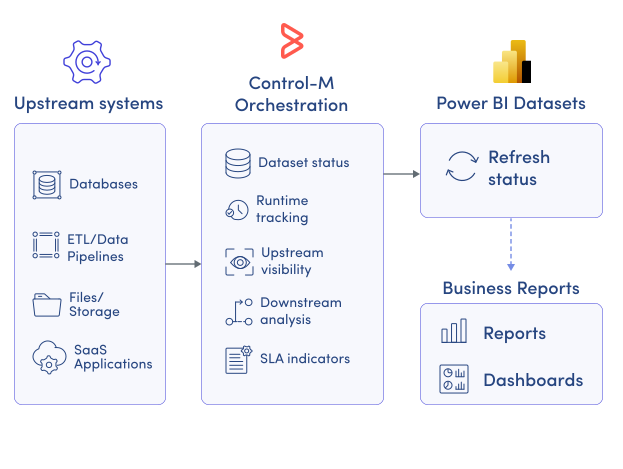
Power BI provides refresh status, but not visibility across the upstream systems feeding analytics. Control-M delivers centralized monitoring across the entire workflow, helping teams understand report readiness and operational risk through:
-
Dataset refresh status
-
Runtime history tracking
-
Upstream dependency visibility
-
Downstream impact analysis
-
SLA risk indicators
SLA ASSURANCE
Keep Power BI reporting commitments on schedule.
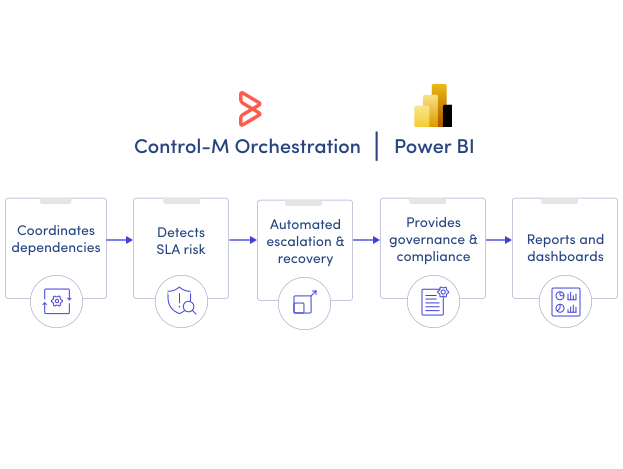
Business users depend on reports being available at specific times. Control-M proactively monitors workflow execution, predicts SLA breaches, and automates corrective actions before reporting deadlines are missed:
-
SLA breach prediction
-
Automated alerting
-
Conditional workflow recovery
-
Escalation policies
-
Business deadline tracking
Documentation
Bring order to complex workflows
Learn how Control-M helps teams orchestrate complex processes with greater visibility, coordination, and control.
