Let us know how we can help
Sales & Pricing
Speak to a rep about your business needs

Help & Support
See our product support options
General inquiries and locations
Contact us


 Control-M + Qlik Cloud
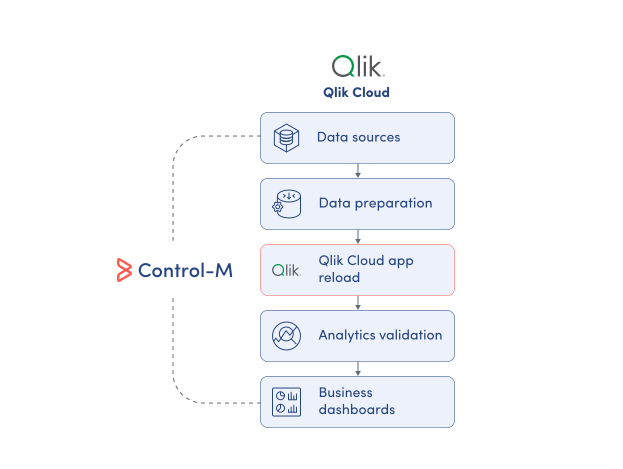
Your Qlik Cloud workflow starts before an app reload ever runs, and it can fail when an upstream process breaks. A Qlik Talend Data Integration task does not deliver the expected data. A Snowflake transformation finishes after the scheduled reload window. Control-M coordinates the full workflow: data arrival, transformation, Qlik Cloud app reload, and analytics delivery.
common workflow issues
Does this sound like your week?
These aren’t edge cases. They’re the normal operating conditions for teams running Qlik Cloud reloads across multiple tools. Here’s how Control-M handles each one.
DATA READINESS
Your Qlik app reloaded. The upstream data task was still running.
Control-M makes the Qlik Cloud reload dependent on successful upstream processing rather than an isolated schedule. It evaluates the preceding job state before starting the reload, preventing analytics from refreshing before required data is ready.
RELOAD FAILURE
Your 6:00 AM app reload failed. Business users found out first.
Control-M monitors the status, results, and output of the Qlik Cloud job within the managed workflow. Teams receive a clear operational signal when a reload fails, helping them respond before business users encounter stale analytics.
SCHEDULE DRIFT
Snowflake finished late. Qlik refreshed before the new data was ready.
Control-M links the Qlik Cloud reload to the completion of its upstream jobs. Instead of relying on an assumed Snowflake finish time, the reload begins only after the required processing completes, keeping analytics aligned with the data the business expects.
PARTIAL RELOAD
Only incremental data changed. You’re still running a full reload.
Control-M can execute either a full or partial Qlik Cloud app reload. When the app’s load script is designed for partial reload, teams can invoke that reload mode as part of the broader workflow instead of defaulting every run to a full reload.
CROSS-TOOL VISIBILITY
The Qlik reload succeeded. You still cannot trace the full analytics workflow.
Control-M places the Qlik Cloud reload in the same managed workflow as the jobs before and after it. Teams can follow dependencies, status, results, and output across the process instead of viewing the reload as an isolated technical event.
INTEGRATION FACTS
Control‑M + Qlik Cloud
|
Platform & OS coverage |
Qlik Cloud endpoint · Control-M SaaS · Control-M/Agent on Linux or Windows · Automation API |
|
Job types supported |
Qlik Cloud app reload · full reload · partial reload |
|
SLA monitoring & alerting |
Job status, results, and output monitoring · SLA job support · centralized workflow monitoring · cross-job dependency visibility |
|
Audit trail & access controls |
Connection and operational controls” and the value to:“Secure Qlik Cloud connection profile · configurable Qlik Cloud endpoint · centralized job results and output · Control-M access controls |
end-to-end orchestration
One production workflow. Every tool in the stack.
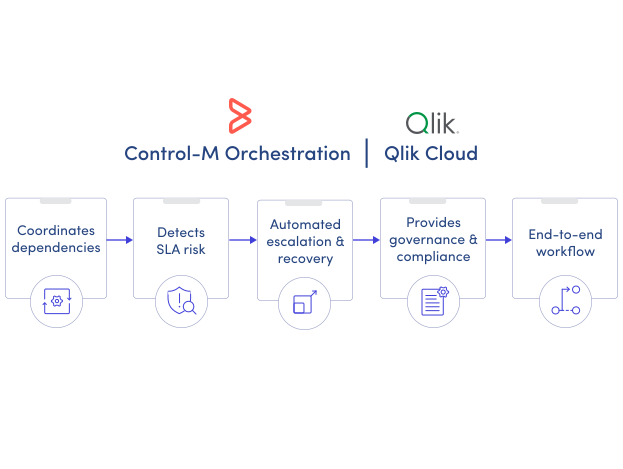
Control-M orchestrates workflows across Qlik Cloud, Snowflake, Qlik Talend Data Integration, file transfers, and cloud services in a single job flow — with dependency tracking, SLA visibility, and automated recovery across all of them.
- Cross-tool dependency: Snowflake → Qlik Cloud reload → analytics handoff
- Dependency-driven execution: file arrival, upstream job completion, scheduled start, Qlik Cloud job completion
|
Qlik Cloud |
full app reload · partial app reload · job status · results and output |
|
Snowflake |
SQL execution · workload dependencies · completion tracking |
|
Qlik Talend Data Integration |
upstream data-integration task · completion dependency · workflow handoff |
|
File transfers |
managed file movement · arrival dependencies · downstream triggering |
|
Cloud services |
source-data processing · file delivery · upstream completion dependencies |
MONITOR RELOADS
Monitor Qlik Cloud reloads with workflow context
A Qlik Cloud app reload is only one step in the analytics delivery process. Control-M brings the reload into the broader production workflow, helping application and business owners understand whether the complete process is ready for use across:
-
App reload status
-
Results and operational output
-
Upstream data dependencies
-
End-to-end workflow readiness
SLA ASSURANCE
Deliver refreshed analytics when the business expects them
A Qlik Cloud app reload can complete successfully and still miss the business deadline it supports. Control-M manages that reload within the end-to-end workflow, helping owners track analytics delivery against the timing expected by the business:
-
End-to-end SLA visibility
-
Dependency-driven reload execution
-
Centralized workflow monitoring
-
Cross-platform failure visibility
Documentation
Bring order to complex workflows
Learn how Control-M helps teams orchestrate complex processes with greater visibility, coordination, and control.
